Summary
WMI (MITRE Technique ID T1047) is a well-known legitimate Windows management framework widely used by system administrators, enterprise tools, and security products. At the same time, WMI has become an attack surface for adversaries due to its deep integration with the Windows operating system, flexibility, and ability to operate stealthily without dropping traditional malware.
This module provides a deep technical analysis of WMI tradecraft from both attacker and defender perspectives. Participants will learn how WMI is abused for execution, lateral movement, persistence, and stealthy backdoor deployment, and how to detect, hunt, and investigate malicious WMI activity using logs, ETW, and low-level artifacts.
Modern threat actors abuse WMI for multiple stages of the attack lifecycle, including local and remote command execution, lateral movement across domain environments, stealthy persistence via permanent event subscriptions, and advanced backdoors implemented as custom WMI providers. These techniques often blend into legitimate administrative activity, making detection challenging when defenders lack visibility into WMI internals.
This course takes a tradecraft-driven approach to WMI analysis. Rather than treating WMI as a black box, participants will explore its internal architecture, execution paths, COM interfaces, repository behavior, and logging mechanisms.
In this module, we will cover the following topics:
- WMI Architecture
- Main WMI components
- Component Object Model (COM)
- WMI Execution (T1047)
- Suspicious WMI Execution
- WMI Execution Detection
- WMIC Process Call Create Detection
- WMI Lateral Movement(T1021)
- Windows Remote Management (WinRM)
- Impacket wmiexec.py
- WMI Lateral Movement Detection
- WMI Network Detection
- WMI Event Subscription (T1546.003)
- Malicious WMI Event Subscription Detection
- MOF File Creation
- WMI Repository File Access
- Malicious WMI Provider
- Malicious WMI Provider Detection
- MOF File Creation Detection
- WMI Provider Registration Detection
- Executable File Creation in Wbem Folder
- New WMI Provider was initialized by WMI Service
You can start and stop the module at any time and pick up where you left off. There is no time limit or grading, but you must complete all exercises and the skills assessments to receive the maximum number of cubes and have this module marked as complete.
A firm grasp of these prerequisites is recommended before starting:
- A basic understanding of the C++ programming language.
- Fundamental Windows internals (processes, services, COM concepts)
- Basic understanding of Windows security logging and auditing
- Familiarity with MITRE ATT&CK framework
- Introductory knowledge of PowerShell and Windows command execution
- General concepts of endpoint detection and threat hunting
- Completion of Understanding Log Sources and Investigating with Splunk
Introduction to WMI
WMI stands for Windows Management Instrumentation. It is Microsoft's core infrastructure for managing data and operations on Windows, providing a uniform way for scripts, apps, and system components to access information about hardware, software, and configuration, often used for automation and monitoring. WMI provides a uniform interface for any local or remote applications or scripts that obtain management data from a computer system, a network, or an enterprise. The uniform interface is designed such that WMI client applications and scripts do not have to call a wide variety of operating system application programming interfaces (APIs).
The diagram below shows the architecture of WMI.
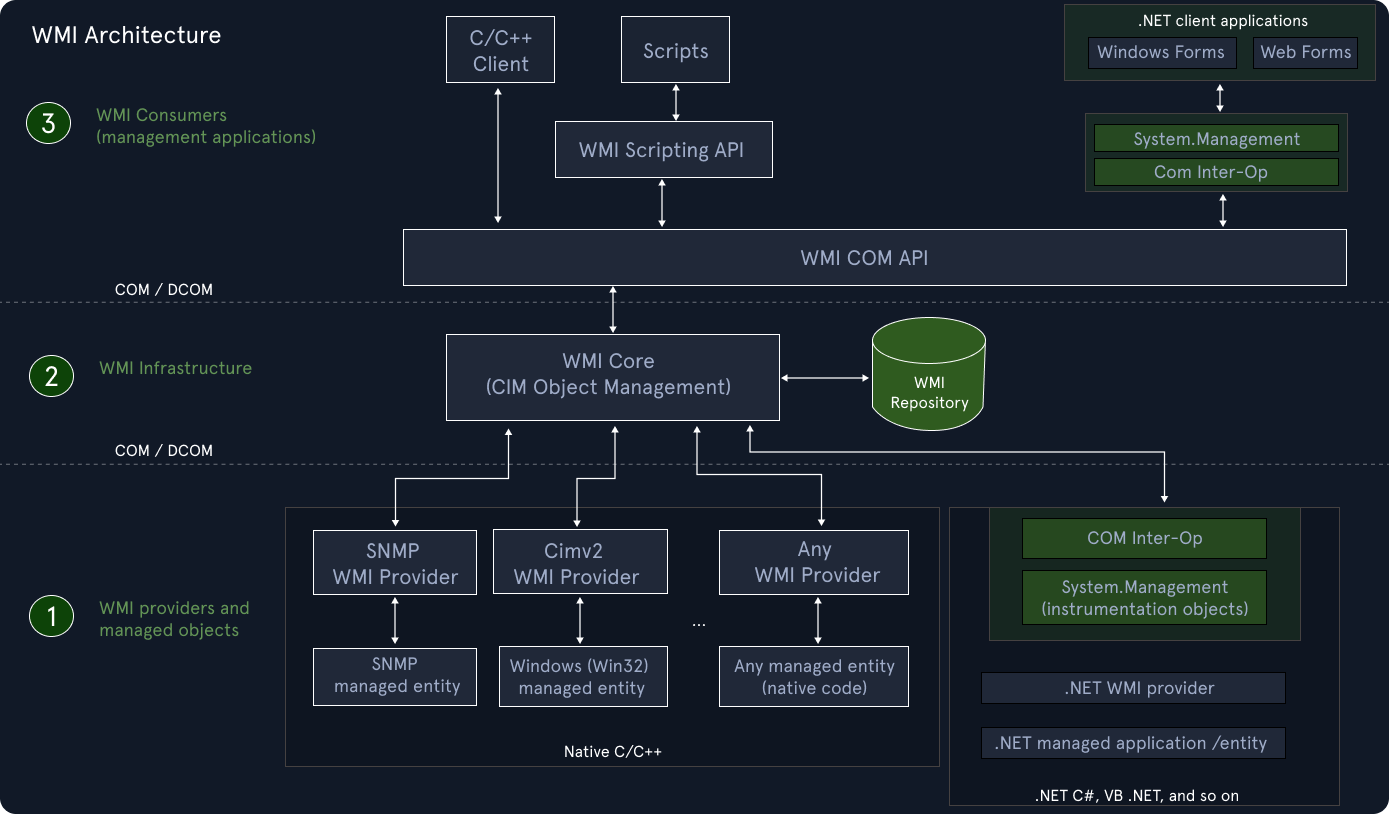 Image source: Microsoft - WMI Architecture
Main WMI components
Let's understand the main WMI components shown in this diagram.
WMI Providers and Managed Objects
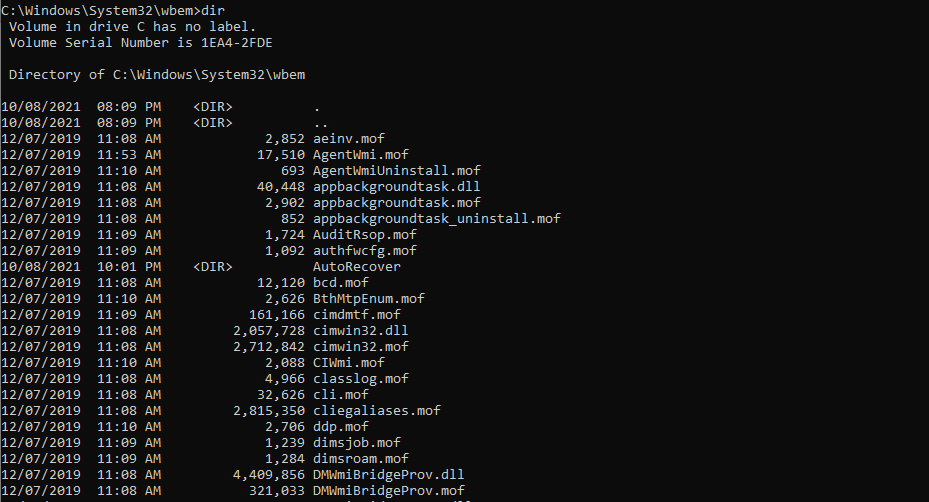
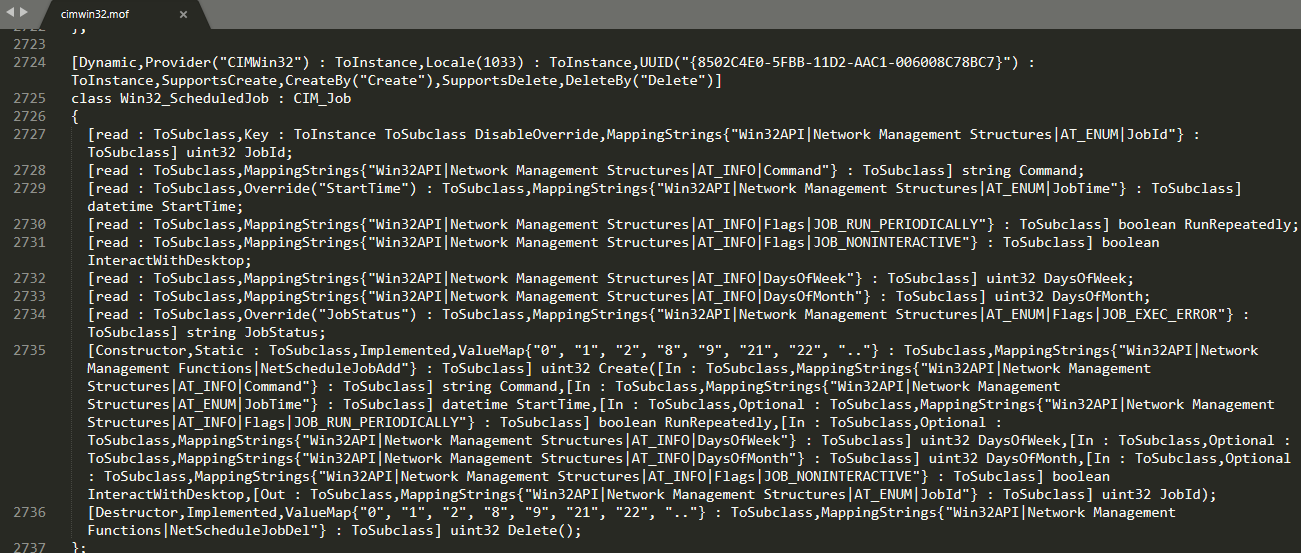
A WMI provider is a COM object that monitors one or more managed objects for WMI, where a Managed Object is a logical or physical enterprise component, such as a hard disk drive, network adapter, database system, operating system, process, or service. WMI providers consist of a DLL file and a Managed Object Format (MOF) file. MOF is the language used to describe Common Information Model (CIM) classes, WMI namespaces, providers etc.. It defines the classes for which the provider returns data and performs operations.
WMI MOF (with extension .mof) and DLL files are located in %WINDIR%\System32\Wbem directory.
Here's an example of Win32_ScheduledJob MOF definition from C:\Windows\System32\wbem\cimwmi32.mof.
We can write custom MOF files as well.
WMI infrastructure
WMI infrastructure is a Microsoft Windows operating system component known as the WMI service (winmgmt), which consists of the WMI Core and the WMI repository. The WMI service (winmgmt) is the operating system component that acts as the mediator between management applications and WMI data providers, and is implemented as a service process within a shared service host process (svchost.exe -k netsvcs -p).
The PowerShell snippet below shows the service details.
PS C:\> Get-Service winmgmt

Status   Name               DisplayName
------   ----               -----------
Running  winmgmt            Windows Management Instrumentation
The WMI repository is organized by WMI namespaces, where WMI service creates some namespaces such as root\default, root\cimv2, and root\subscription at system startup and pre-installs a default set of class definitions, including the Win32 Classes, the WMI System Classes, and others. Only static data about objects is stored in the repository, such as the classes defined by providers. WMI obtains most data dynamically from the provider when a client requests it.
WMI Explorer can be used to view the WMI repository and WMI objects. The screenshot below shows an example of WMI Explorer interface showing the WMI classes.
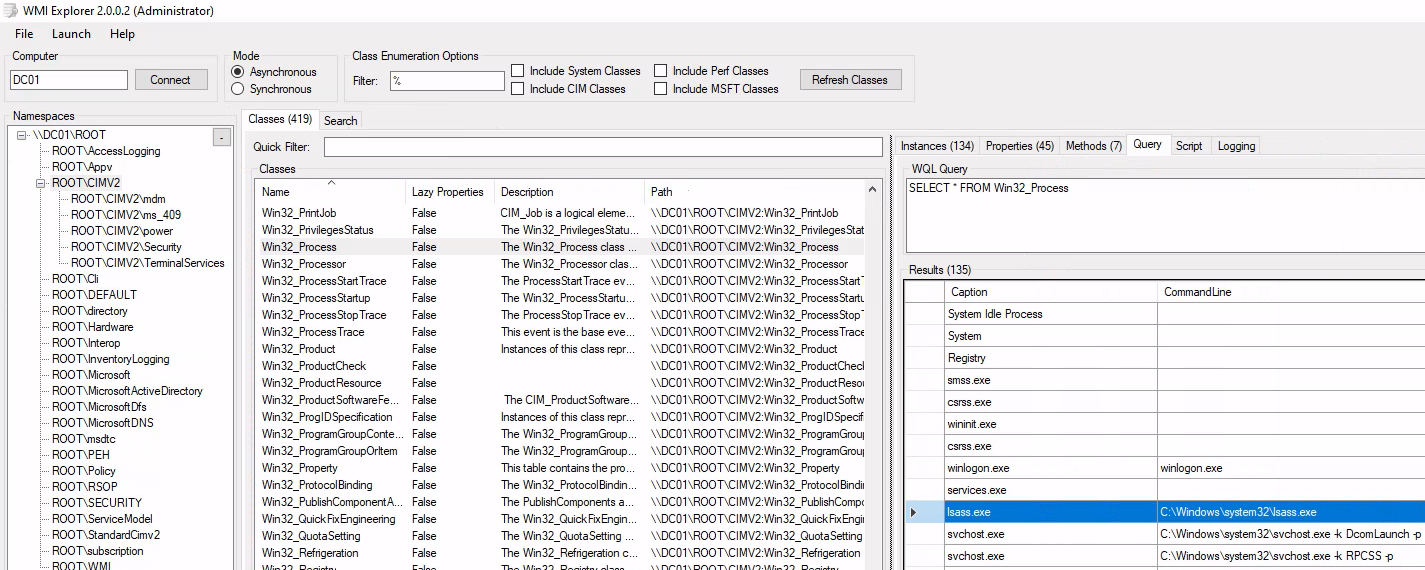
Also using Powershell, we can list all namespaces inside the root namespace by using Get-WmiObject command.
PS C:\> Get-WmiObject -Namespace "root" -Class "__Namespace"


__GENUS          : 2
__CLASS          : __NAMESPACE
__SUPERCLASS     : __SystemClass
__DYNASTY        : __SystemClass
__RELPATH        : __NAMESPACE.Name="subscription"
__PROPERTY_COUNT : 1
__DERIVATION     : {__SystemClass}
__SERVER         : DC01
__NAMESPACE      : ROOT
__PATH           : \\DC01\ROOT:__NAMESPACE.Name="subscription"
Name             : subscription
PSComputerName   : DC01

__GENUS          : 2
__CLASS          : __NAMESPACE
__SUPERCLASS     : __SystemClass
__DYNASTY        : __SystemClass
__RELPATH        : __NAMESPACE.Name="DEFAULT"
__PROPERTY_COUNT : 1
__DERIVATION     : {__SystemClass}
__SERVER         : DC01
__NAMESPACE      : ROOT
__PATH           : \\DC01\ROOT:__NAMESPACE.Name="DEFAULT"
Name             : DEFAULT
PSComputerName   : DC01

<SNIP>

PS C:\> Get-WmiObject -Namespace "root" -Class "__Namespace" | select name

name
----
subscription
DEFAULT
MicrosoftDfs
CIMV2
msdtc
Cli
MicrosoftActiveDirectory
SECURITY
RSOP
MicrosoftDNS
PEH
StandardCimv2
WMI
AccessLogging
directory
Policy
InventoryLogging
Interop
Hardware
ServiceModel
Microsoft
Appv
WMI consumers (Management Application)
A WMI consumer is a management application or script that interacts with the WMI infrastructure. A management application can query, enumerate data, run provider methods, or subscribe to events by calling either the COM API for WMI or the Scripting API for WMI.
Some of the examples of the consumers are wmic.exe, PowerShell.exe, custom administrative scripts, management and monitoring tools etc.
The following PowerShell example demonstrates how a WMI consumer (PowerShell) can query the Win32_Service class to retrieve service details, including the service state and the service binary (executable) path backing the service.
PS C:\> Get-WmiObject Win32_Service | Where-Object { $_.Name -eq "winmgmt" } | Select Name, State, PathName

Name    State   PathName
----    -----   --------
Winmgmt Running C:\Windows\system32\svchost.exe -k netsvcs -p
Component Object Model (COM)
Before diving into WMI execution analysis, let's make a quick detour into Microsoft Component Object Model (COM) and how it works.
COM allows the creation of reusable software libraries that interact at runtime without requiring compilation into applications. A COM object exposes its features through an interface, which is a collection of member functions. A COM class implements a number of COM interfaces, and the implementation consists of binaries that run when a caller interacts with an instance of the COM class. On a Windows platform, classes exist either in a dynamic-linked library (DLL) or in another application (EXE).
On its host system, COM maintains a registration database of all the CLSIDs for the COM objects installed on the system. The registration database is a mapping between each CLSID and the location of the DLL or EXE that houses the corresponding class. COM queries this database whenever a caller wants to create an instance of a COM class. The caller needs to know only the CLSID to request a new instance of the class.
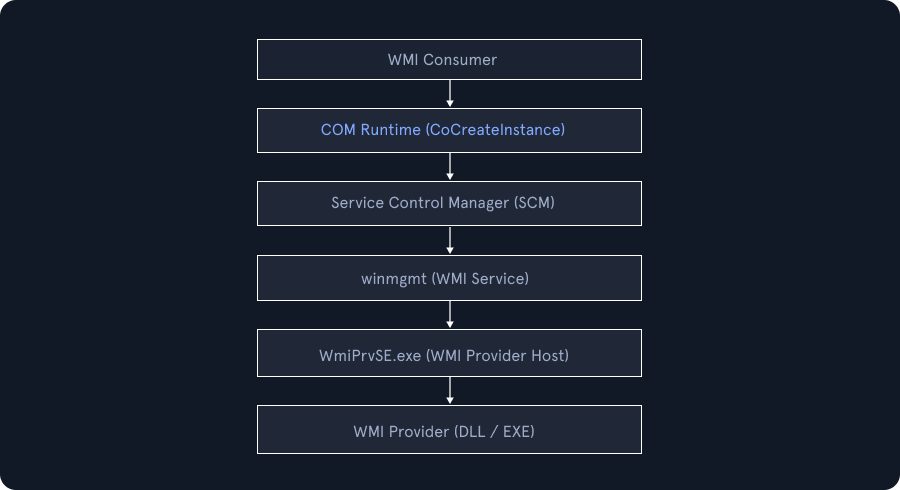
The CoCreateInstance function creates one instance of the specified CLSID and returns an interface pointer of the type requested by the client. The Service Control Manager (SCM) handles the client request for an instance of a COM object. The following list shows the sequence of events:
A client requests an interface pointer to a COM object from the COM Library by calling a function such as CoCreateInstance with the CLSID of the COM object:
- The COM Library queries the SCM to find the server that corresponds with the requested CLSID.
- The SCM locates the server and requests the creation of the COM object from the class factory that is provided by the server.
- If successful, the COM Library returns an interface pointer to the client.
After the COM system connects a server object to a client, the client and object communicate directly.
This diagram below illustrates that the WMI operations are executed using the Component Object Model (COM). A WMI consumer first initializes COM and requests WMI interfaces (such as IWbemLocator) using CoCreateInstance. The COM runtime consults the Service Control Manager (SCM) to locate and activate the appropriate WMI server components. The WMI service (winmgmt, hosted in svchost.exe) manages namespaces, security, and provider activation, spawning one or more WmiPrvSE.exe processes to host WMI providers.
Some of the most important COM interfaces used by WMI include:
| COM Interface | Purpose |
|---|---|
| IWbemLocator | Connects to a WMI namespace |
| IWbemServices | Executes queries, methods, and instance operations |
| IWbemClassObject | Represents WMI classes and instances |
| IWbemObjectSink | Receives asynchronous results |
| IMofCompiler | Compiles MOF files into the WMI repository |
These interfaces are implemented in core WMI DLLs such as:
-
wbemcomn.dll -
fastprox.dll -
wbemcore.dll -
wmiutils.dll
When you register a COM server with the host system, you can specify different ways for the server to be activated. The following list shows the three ways that the SCM can activate a COM server:
-
In-process: The SCM returns the file path of the DLL that contains the object server implementation. The COM Library loads the DLL and queries it for its class factory interface pointer. -
Local: The SCM starts the local executable, which registers a class factory on startup, and its interface pointer is available to the system and clients. -
Remote: The local SCM acquires a class factory interface pointer from the SCM that is running on a remote computer.
COM enables remote and distributed computation. Interface remoting enables a member function to return an interface pointer to a COM object that is in a different process or on a different host computer:
- To communicate with a COM object, a client always calls an in-process implementation. If the COM object is in-process, the call is direct. If the COM object is out-of-process or remote, COM provides a proxy implementation that forwards the call to the object by using the Remote Procedure Call (RPC) protocol.
- A COM object always receives calls from a client through an in-process implementation. If the caller is in-process, the call is direct. If the caller is out-of-process or remote, COM provides a stub implementation that receives the remote procedure call from the proxy in the client process.
- Marshaling is the procedure for packaging the call stack for transmission from proxy to stub. Unmarshaling is the unpackaging that occurs at the receiving end. Return values are marshaled and unmarshaled from the stub to the proxy.
- Each different data type has rules for marshaling. Interface pointers also have a marshaling protocol, which is encapsulated in the CoMarshalInterface function. In most cases, standard interface marshaling, which is provided by the system, is sufficient, but a COM object may optionally implement custom interface marshaling to control the creation of remote object proxies to itself. For more information, see Inter-Object Communication.
Use of WMI in Real world attacks
In MITRE ATT&CK, WMI is documented under Execution, Privilege Escalation, and Persistence.
Real-world incidents and malware campaigns demonstrate how WMI has been leveraged in offensive operations. During the 2016 Ukraine Electric Power Attack, WMI was used within scripts to perform remote execution and system surveys, enabling attackers to manage compromised hosts at scale. Commodity malware such as Action RAT and Agent Tesla have abused WMI queries to collect system intelligence, including installed security products, aiding in situational awareness and evasion. Ransomware families like Akira have leveraged COM objects accessed through WMI during execution to reduce detection and blend into normal system activity.
Some of the procedure examples mentioned by MITRE are as follows:
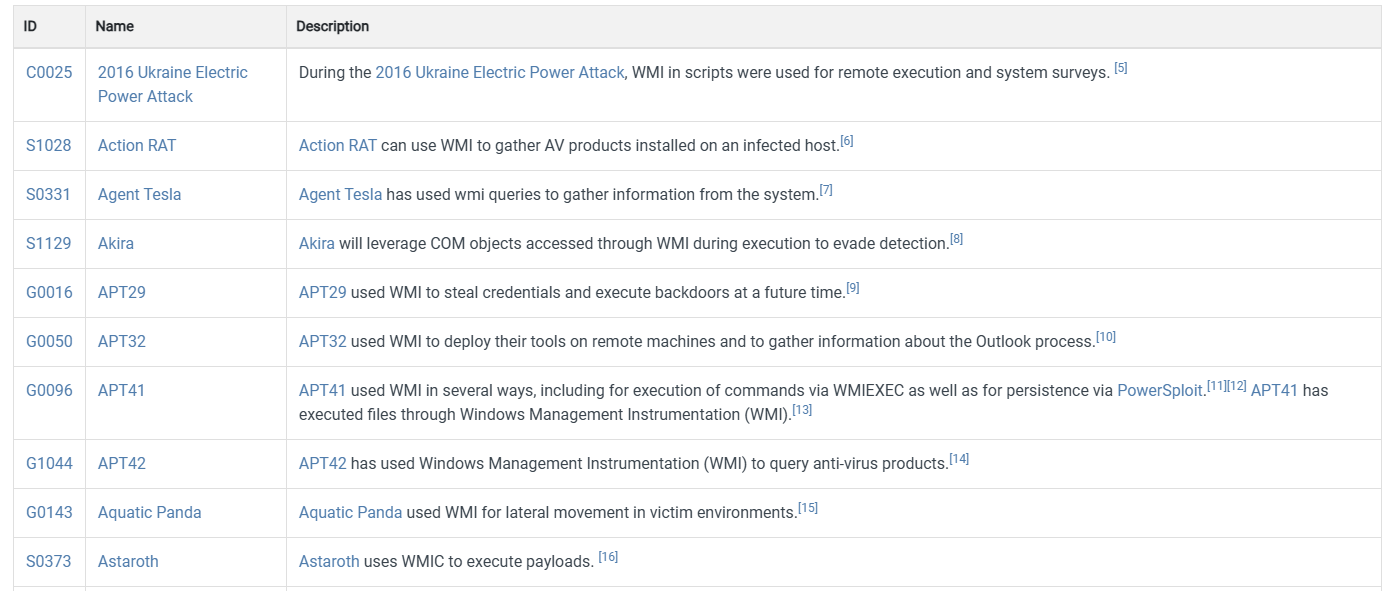
APT groups have also relied heavily on WMI as part of their tradecraft. Groups such as APT29, APT32, APT41, and APT42 have used WMI for credential theft, remote tool deployment, command execution, persistence mechanisms, and security product discovery. These cases underline that WMI is not merely a convenience for attackers but a mature and reliable mechanism embedded into sophisticated attack chains.
As a result, understanding WMI abuse patterns and monitoring its usage is important for defenders, so that we can detect stealthy lateral movement, living-off-the-land execution, and long-term persistence in Windows environments.