 Mini-Module

Summary
The Windows Registry Forensics module is designed for incident Responders, Incident Responder candidates, and Forensics Experts. Throughout this module, students will develop acquiring Registry Hives and extract evidence from Windows Registry.
Recommended prior knowledge:
- Windows fundamentals
Introduction to Windows Registry Forensics
Microsoft Windows is one of the most used operating systems to date. It is widely used by home and enterprise users. This makes this platform a major target for threat actors. So, it is important for cybersecurity professionals to understand how to perform forensics investigations on Windows systems. In this module we will be discussing the Windows registry and the valuable artifacts and information it stores.
What is the Windows Registry?
The Windows Registry is a central repository of information and settings for the Windows operating system and its installed applications. It is a hierarchical database that stores a wide range of configuration data, including information about system hardware, installed programs, user settings, recently accessed files, devices connected , applications executed etc.
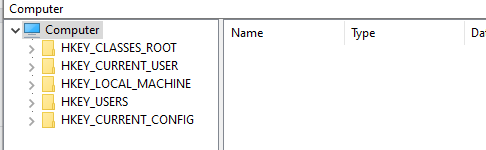
The registry is organized into a series of keys, with each key representing a different aspect of the system's configuration. The keys are organized in a hierarchical structure, with parent keys containing child keys and values. Some of the most important keys in the registry which we call root keys are:
- HKEY_LOCAL_MACHINE:This key contains information about the system's hardware and installed programs, including details about device drivers, startup programs, services installed, and system settings etc.
- HKEY_CURRENT_USER: This key contains information about the user's specific settings and preferences, such as desktop background, applications executed, searched items, keyboard layout etc.
- HKEY_USERS: This key contains information about the users on the system, including their user profiles and settings.
- HKEY_CLASSES_ROOT:This key contains information about the file associations and COM classes on the system, which determine how different file types are opened and handled.
Each key in the registry can contain various values, which are the actual data stored in the registry. The values are organized into name-value pairs, with the name identifying the value and the value containing the actual data. For example, a value with the name "WallPaper" stores the path of the desktop background. Windows loads the background image from the path found in the registry. In the below example we see the name “WallPaper” with value of "C:\Users\pc\Pictures\Wallpapers\LetsDefend.png". Windows know what image to load as wallpaper from this registry location.

Registry Hives
The root keys we discussed above are supported by registry hives which contain the actual registry data. A hive is a logical group of keys, subkeys and values in the registry. Following important hives are located at “C:\Windows\System32\Config*”.
-
DEFAULT Hive:This contains default settings for the operating system and applications, and is used as a template when a new user account is created. -
SYSTEM Hive:This contains settings for low-level system components, such as drivers and services. -
SAM (Security Accounts Manager) Hive:This contains information about user accounts on the local computer, including hashed versions of their passwords. -
SOFTWARE Hive:This contains information about the installed programs and their settings. -
SECURITY Hive:This contains security-related settings, such as access control information for system resources.
All of these hives except DEFAULT are plugged in to HKEY_LOCAL_MACHINE Key, meaning we can find contents of SYSTEM Hive under HKEY_LOCAL_MACHINE\SYSTEM subkey, contents of SAM hive under HKEY_LOCAL_MACHINE\SAM and so on.
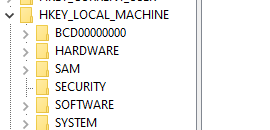
For example the contents of SYSTEM hive can be viewed from:
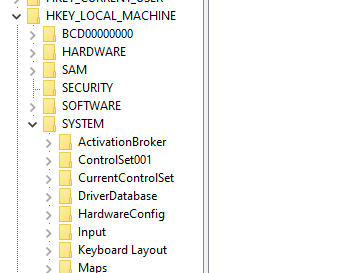
Another 2 important hives are user specific, meaning that every user on a computer will have their own version of these hives. These hives are plugged into the HKEY_CURRENT_USER key. The above discussed are global and user independent. These 2 hives are:
• NTUSER.DAT:This hive contains the registry settings for a specific user account on a Windows computer. This stores information about the user's personal settings, such as desktop background, start menu configuration, and application settings. NTUSER.DAT is located in the user's profile folder, which is typically found in theC:\Users\{username}or%USERPROFILE% directory.

USRCLASS.DAT:This hive contains the registry settings for applications that are installed for a specific user account on a Windows computer. This stores information about the user's installed programs and their settings. UsrClass.dat is located in%USERPROFILE%\AppData\Local\Microsoft\Windows.

Note: These files are hidden by default, so you may want to enable the view hidden files checkbox in file explorer.
-Amcache Hive: Another important hive is Amcache. This is used by Windows to track changes to installed applications and to improve the performance of the operating system. For example, when an application is installed or updated, the information about the change is recorded in this hive. This allows Windows to quickly access the information about installed applications without having to search through the entire system for it.
Its located at C:\Windows\appcompat\Programs\Amcache.hve”.
Registry Backups and Transaction Logs
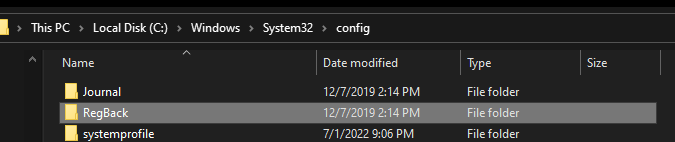
Windows automatically takes a backup of the whole registry structure in case of a failure. This is stored under C:\Windows\System32\Config\RegBack. This is critical to analyze as the backup registry can have the values which aren't in the latest registry. This may help us in finding any tampered registry keys by comparing the backup and current registry values.
Transaction logs are files in the same location as hives with extensions “.LOG” , “.LOG1” , “.LOG2” and so on, depending on the state of the registry. These are copies of the hives with latest changes in values of registry keys, subkeys. Windows uses transaction logs to keep the original hives from getting corrupted and to ensure proper working of registry. These can contain the latest values that are yet to be transitioned to original registry hives. Most of the forensic tools load the transaction logs alongside the original hive file automatically. We must acquire the transaction logs, if any, when acquiring registry hives.
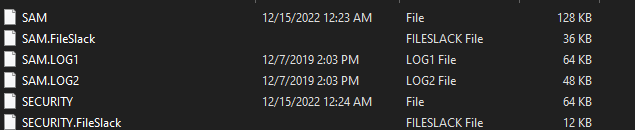
So, in conclusion we learnt that hives are the files which contain actual registry data. That's why it's important to know the types of hives, their locations and what type of data they can provide us. During the investigation, we only have access to the disk image of the computer most of the time so knowing the hive files and their locations can allow us to extract and analyze them. On a live system, we can directly navigate to the registry using the regedit tool which is a built-in registry tool in Windows. We will discuss this in the next section.
HKEY_LOCAL_MACHINE(HKLC) and HKEY_CURRENT_USER(HKCU) keys are the most important registry keys since most of the data of forensic value is stored under these keys.
Registry forensics can help us extract relevant information and evidence. This can include identifying recently installed programs, determining user activity and login history, and uncovering any malicious or suspicious activity on the system.
To perform registry forensics, you must have a thorough understanding of the structure and contents of the registry, as well as the tools and techniques used to analyze it. After completing this module you will be able to perform registry forensics comfortably. We will discuss important artifacts that can be found in registry hives, analyze them with different tools and discuss scenarios in the context of digital forensic investigations in the next chapter. At the end of course you will have 2 practical cases to test your skills and practice.
In this section, we discussed the Windows registry, its structure, the hives, and why it's important for forensics investigations.