 Mini-Module

Summary
The Reverse Engineering 2 module is designed for computer science or engineering students interested in gaining knowledge and skills in reverse engineering, Cybersecurity professionals looking to enhance their knowledge of reverse engineering for vulnerability analysis and software security, Software developers or programmers seeking to expand their understanding of low-level code and debugging techniques, and Hobbyists or enthusiasts with a curiosity for exploring the intricacies of software through reverse engineering techniques. Throughout this module, students will develop a solid understanding of registers and their role in computer architecture, reverse engineering skills to analyze and comprehend the inner workings of software from a reverse engineering perspective, proficiency in X86 Assembly language, enabling analysis and manipulation of low-level code, and acquire knowledge of CPU instructions and their execution mechanisms, allowing for detailed examination of software behavior.
Recommended prior knowledge:
-
Basic understanding of computer architecture and operating systems
-
Familiarity with at least one programming language
-
Comfort with working in a command-line environment
Registers - 1
What is Register?
Registers are the variables in the assembly language. The size of each register in x86 architecture is 32 bits. Registers are located in the processor and each processor can have its own proprietary registers.
General Purpose Registers
General purpose registers can be divided into 3 subcategories:
-
Data Registers
-
Pointer Registers
-
Index Registers
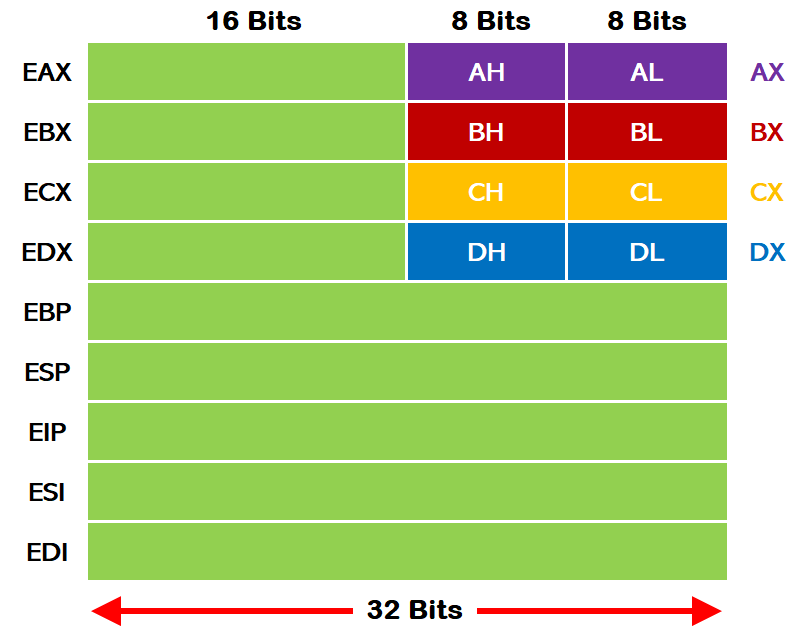
Data Registers
Data registers are the ones that contain data.
EAX (Accumulator Register)
The most basic register used in arithmetic operations is the "EAX" register. It stores the results of arithmetic operations and the return values of functions. For example, it is used for operations such as addition and multiplication.
EBX (Base Register)
It is the register that holds the base address of the program.
ECX (Counter Register)
The ECX is the register that is used as counter. It is used in loop and string operations.
EDX (Data Register)
It is a register that is generally used for holding data. It is also used in I/O (Input/Output) operations.
Pointer Registers
Pointer registers are the ones that hold memory addresses.
EBP (Base Pointer)
EBP is the one that holds the lowest address of the Stack and is used for local variables.
ESP (Stack Pointer)
It is the register that holds the top address of the stack. Displays the last element that entered the Stack.
EIP (Instruction Pointer)
The EIP register may be the most important register as it holds the address of the next instruction to be executed in the program flow. In other words, if the value of this register is changed, the flow of the program can be interfered with.
2.1.9. Index Registers
Index registers are used for index information storage.
ESI (Source Index)
It is the register that holds the source index information for string operations. It holds the address of where the data will be read.
EDI (Destination Index)
It is the register that holds the destination index information for string operations. It holds the address of where the data will be written.
In this part of the training, we covered what the register is, what the register types are and what tasks the registers fulfil. In the next part of the training, we will cover "Registers - 2", which is the continuation of the Registers.