 Mini-Module
Summary
The Password Management module is designed for detection Engineers, Information Technology (IT) professionals, and Students pursuing degrees in technology and cybersecurity. Throughout this module, students will develop master the art of creating and maintaining strong, resilient passwords, to protect your digital assets from unauthorized access, and best practices for securely storing and managing passwords.
Recommended prior knowledge:
-
Basic computer literacy and familiarity with common software applications
-
A working knowledge of general internet usage
-
No prior cybersecurity or password management experience required
Password Creation Principles
Password management is a critical issue for digital security. A strong and effective password management strategy is an essential step in ensuring the security of information, accounts, and systems. Password management includes users creating strong passwords, updating passwords regularly, and storing passwords securely.
The first step is to create strong passwords. Strong passwords should contain complex and hard-to-guess combinations. Its length, complexity, and uniqueness matter. Regularly changing passwords is a precaution that improves password security and helps protect accounts from malicious use.
Safe storage of passwords is also very important. Writing down passwords, leaving them around insecurely, and sharing them randomly poses a security risk. It is important to store and access passwords securely using password managers or encryption tools. These tools encrypt and protect passwords securely and provide the user with access to a single master password.
Password management also includes additional security measures such as two-factor authentication. Two-factor authentication requires users to log in using a second authentication factor (for example, an SMS verification code, mobile app, or a physical security key). This ensures accounts are secured with an additional layer of protection.
Password Creation Policies
Password creation policies should include the basic principles of creating strong and secure passwords. Password generation principles basically consist of important items such as length, complexity, uniqueness, unpredictability, regular password updates, using automatic password generation tools, etc.
Length: It is important that passwords are too long to guess easily. It is generally recommended to be at least 12 characters long. Longer passwords provide more robust protection.
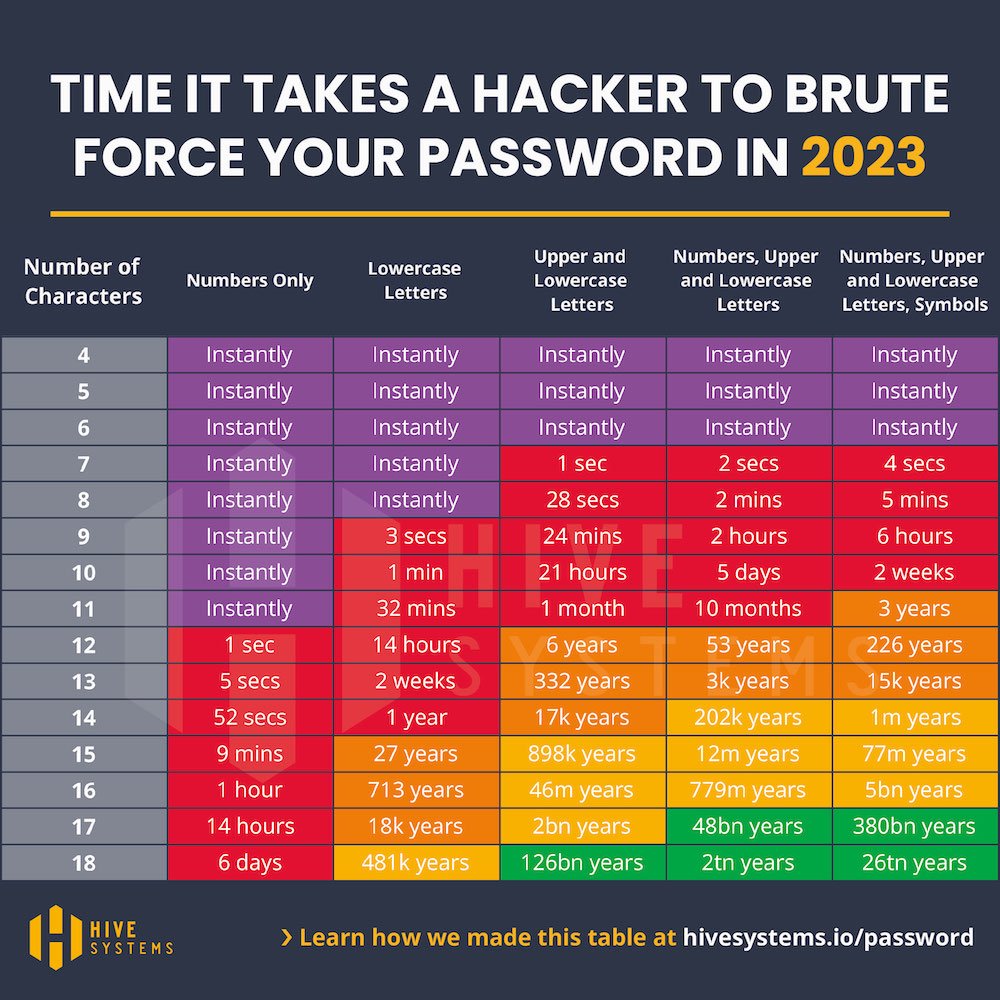
Complexity: Passwords being complex will make them difficult to guess. It is ideal if it contains a combination of uppercase letters, lowercase letters, numbers, and special characters. For example, a complex password such as "P4sSW0rD54S3cUr!tY10" can be considered secure.
Uniqueness: It is important to use unique passwords for each account. Using the same password across multiple accounts will put all those accounts at risk if one account is compromised.
Unpredictability: Passwords should be unpredictable which will make it difficult for attackers to discover the password easily. Personal information such as birth dates, names, and phone numbers should be avoided.
Automatic Password Generation Tools: Automatic password generation tools can be used to generate secure passwords. These tools generate strong passwords randomly and provide an easy option for users.
Password generation policies guide the creation of strong and secure passwords. By following these principles, you can make passwords harder to guess, increase the security of accounts and data, and be more protected from malicious attacks.
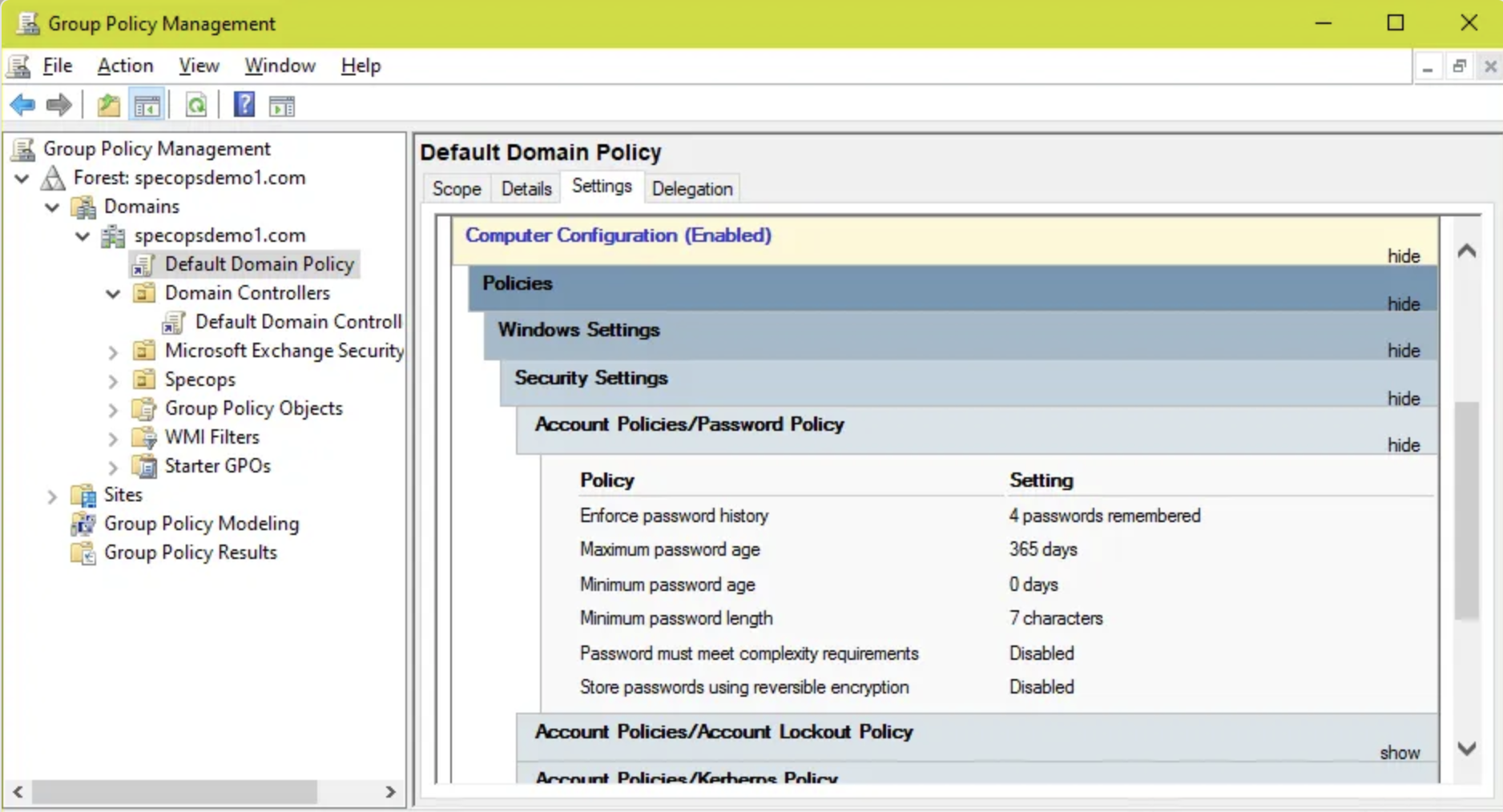
The following section is used to set a password policy on Windows.
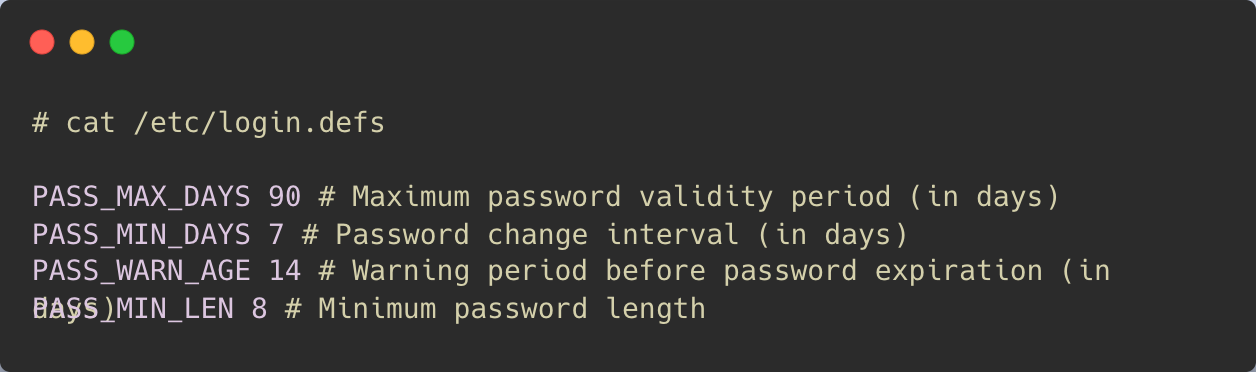
The following file is used to set a password policy on Linux:
In this part of the training, we have covered the important points of setting a secure password. In the next part of our training, Password Update and Change topic will be discussed.