 Mini-Module

Summary
The Event Log Analysis module is designed for incident Responders and Incident Responder candidates. Throughout this module, students will develop an understanding of Event Log structure, detection attacks with Event Logs, and important Event Logs for investigation.
Recommended prior knowledge:
- General understanding of cybersecurity concepts
Introduction to Event Logs
Event logs are records of events that occur on a Windows computer. They contain vital information about system events, such as user log-ins, service starts or stops, as well as application events, such as system errors, etc. Event logs also contain security events, such as user login attempts to login with an incorrect password or when suspicious activity is detected. Event logs are useful for a variety of purposes, including troubleshooting problems, tracking down issues, and identifying patterns or trends. They can also be used for security and compliance purposes, such as auditing and monitoring for security breaches or compliance violations.
Event logs are typically stored on a computer or server, and can be viewed and accessed using tools such as Event Viewer on a Windows system or logrotate on a Linux system. They can also be viewed and accessed remotely, using tools such as Windows Remote Event Log Management.
Event logs are not in human readable format but rather stored as a binary format. We cannot read these logs with text editors like web logs or linux logs. We need specialized tools which convert the event logs in human readable format. Event logs are stored at: “C:\Windows\System32\Winevt\Logs”
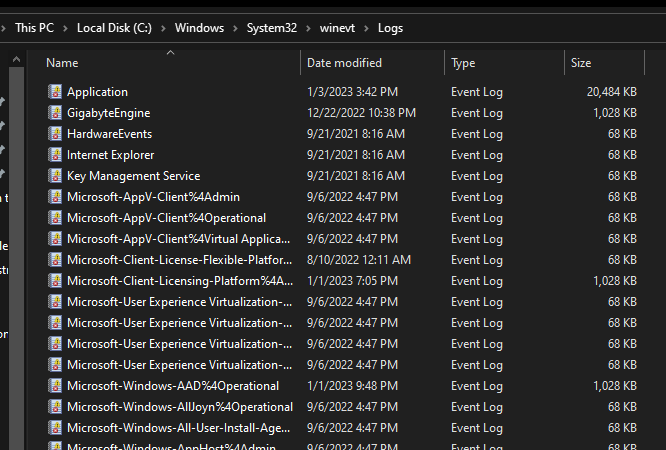
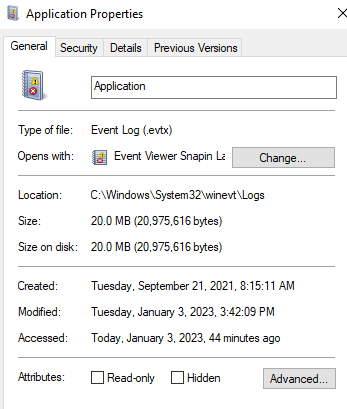
Event log files have the extension “evtx”. Here are properties of an event log file.
Event logs are categorized according to the nature of the information being recorded. Event logs related to the Windows operating system and the operations carried out by the OS are categorized as:
Application Logs: Events related to the installed applications are stored here.
Security Logs: Events related to Sessions logon/logoff, RDP successful/failed connections, services installed, tasks created, etc. are stored here.
System Logs: Events related to hardware states, drivers, etc. are stored here.
Setup: The setup log contains events that occur during the installation of the Windows operating system. On domain controllers, this log will also record events related to Active Directory.
Forwarded Events: Contains event logs forwarded from other computers in the same network.
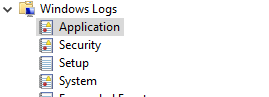
These logs are categorized as “Windows logs”. There is another category called “Application and Services logs” which stores detailed logs about installed applications on the system, either native or installed by users.
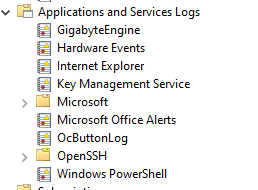
Event logs of the majority of applications are stored under Microsoft->Windows . We will be discussing Windows Defender, firewall logs and RDP logs in upcoming sections.
An event ID is a numerical identifier assigned to each event that is recorded in an event log. It is a unique identifier that is used to identify a specific event or type of event. Event IDs are typically used in conjunction with other event log data, such as the event source and the event time, to provide more context about the event. For example when we logon successfully to our computer, an event is recorded with Event ID 4624 in Security log.

Event IDs are useful for filtering and organizing event log data, as they allow you to quickly identify and group similar events. Many event logs include a list of common event IDs and their meanings, which can be helpful for interpreting and understanding the events that are recorded. We will discuss many Event IDs useful for SOC analysts and incident responders in upcoming sections.
Event logs are further classified into event types. This indicates what kind of event was recorded. These are also called levels. There are 5 types of event logs.
Information: This event type means that an operation was successfully completed and a general description of it is recorded.
Warning: This event type means that there is some kind of minor problem that may cause bigger issues in future events.
Error: This type of event means that a problem occurred causing a loss of functionality.
Critical: Indicates a significant issue in an application or a system needing urgent attention.
Verbose: Indicates progress or success messages for a particular event.
There are also keywords which are similar to levels in Windows Security logs. Some of the important things are.
Audit Success: This event type means that successful security access was attempted.
Audit Failure:This type of event means that a failed security access was attempted.
In this section, we discussed what are event logs, where and how they are stored, and how events are categorized by event IDs and types of events. In the next section, we will discuss some tools to view and analyze event logs to make sense of them. Then we will discuss important event IDs from a security perspective and how to uncover malicious activities from event logs.