 Mini-Module

Summary
The Advanced Event Log Analysis module is designed for incident responders, Cybersecurity analysts, Security operations center (SOC) personnel, and IT professionals responsible for system security. Throughout this module, students will develop proficiency in advanced event log analysis techniques, enhanced ability to detect and investigate security incidents, improved skills in correlating events for accurate threat detection, development of effective incident response strategies, and strengthened capacity to protect systems and networks from cyber threats.
Recommended prior knowledge:
- Basic understanding of cybersecurity concepts and principles
- Familiarity with event logging systems such as Windows Event Viewer or syslog
Process Creation
This module is a follow-up to the Event Log Analysis module.
Process creation events are a type of Windows event that, if enabled, will be recorded in the local Windows Event Viewer as Event ID 4688 whenever a new process is started. They include information such as time, process name, parent process, command line (optional but preferred), and so on.
A process on a Windows computer is just an application running. On a typical workstation or server, several processes will be started on a workday. The majority of these processes are innocent, but the malware will often launch one or more of them as part of its operation. If an attacker gains remote access to a system, they can start multiple processes to interact with a computer and achieve their goals. Process creation events allow you to log such malicious activity and, if logged, it can be identified and monitored, which is what we are trying to do.
When a program is run, it is often given parameters (also known as arguments) to tell it what to do. These parameters are important to defenders because they can provide precise information about the nature of the activity. We call them "command lines" because they provide context for the operation in progress. For example, if a Powershell-encoded command is executed on an endpoint, the process logs will only show the process name 'Powershell', but if we also have the command line, we can immediately identify the problem.
Configure Process Audit Logs
By default, Windows does not have these event auditing settings enabled, so we need to configure this and enable it on the system.
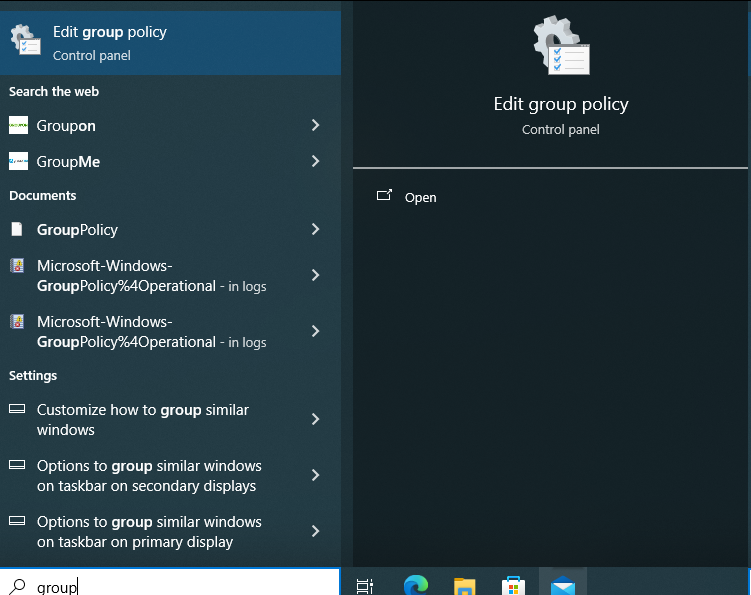
First, type edit group policy in the Windows search bar to open Group Policy Settings.
Then go to Computer Configuration > Windows Settings > Security Settings > Advanced Audit Policy Configuration > Audit Policies > Detailed Tracking > Audit Process Creation
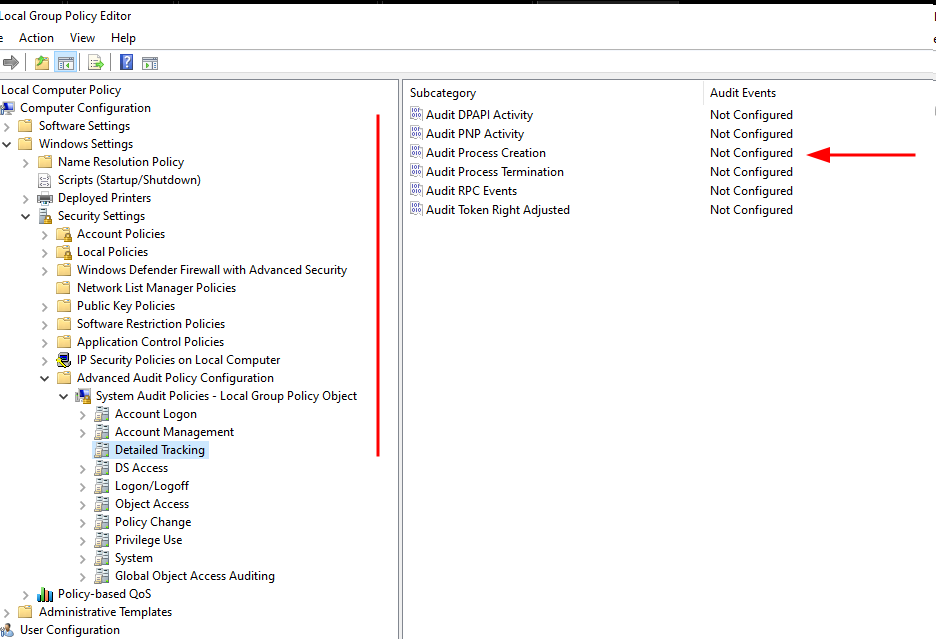
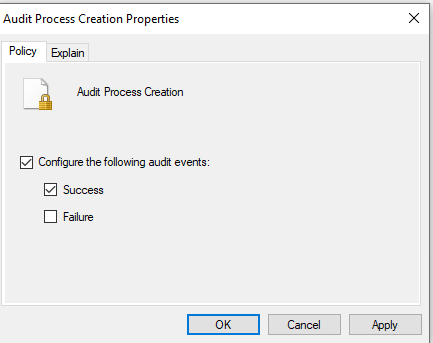
Then click on “Audit Process Creation” and set it to “Success”.
Now we also want to include 'CommandLine' to be logged with process creation. To do so, in the same Group Policy Editor, go to Computer Configuration > Administrative Templates > System > Audit Process Creation > set “Include Command Line in Process Creation Events” to enabled.
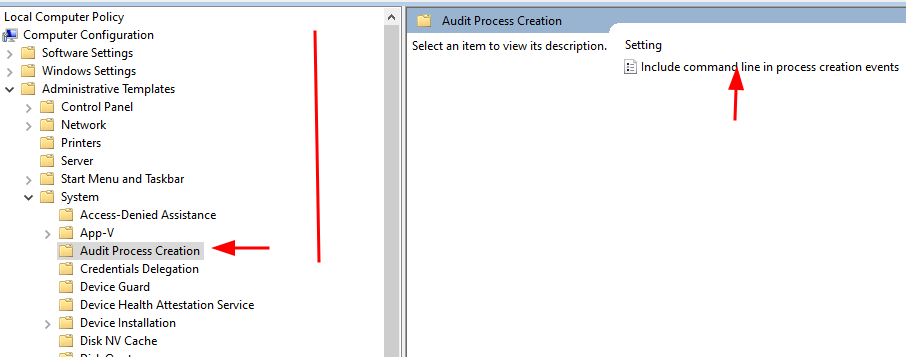
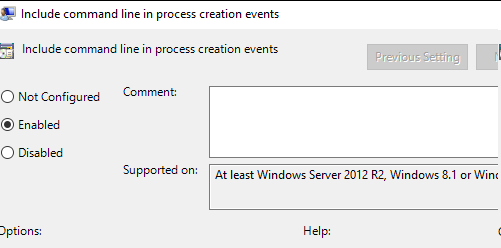
Click on the setting, tick the check box, and apply.
Analysis
Now all the process creation logs have "CommandLine". Let's filter the Windows security logs for Event ID 4688.
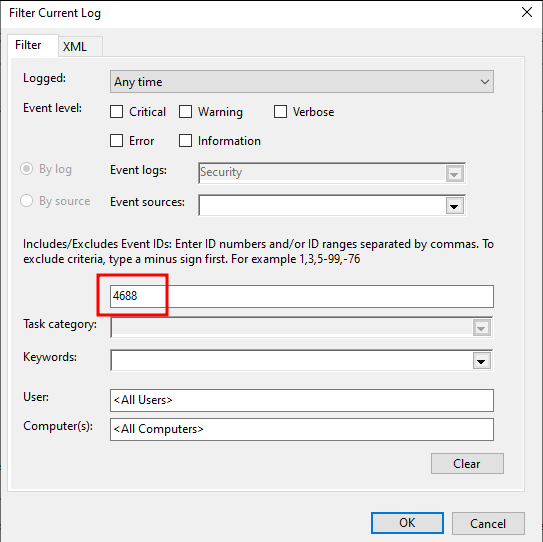
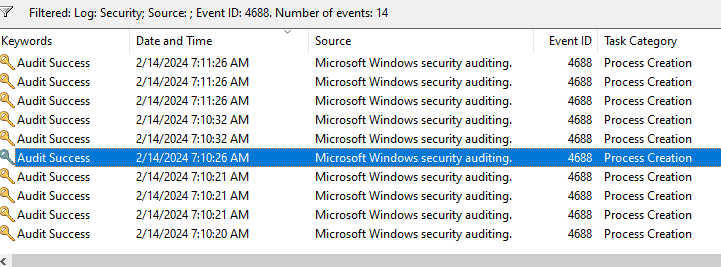
Let's take a look at a sample event to cover important fields in this event log.
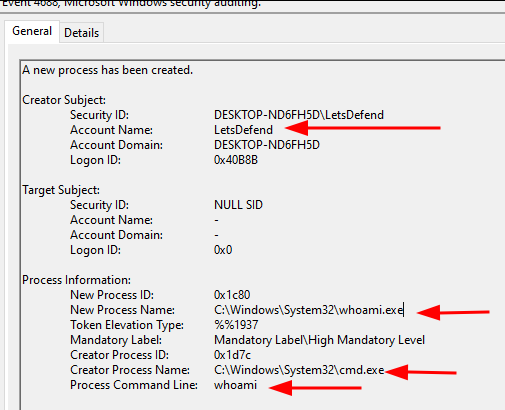
Account Name : The user account used to execute the process.
New Process Name : This field contains the name of the process that was executed and caused this event to be logged.
Creator Process Name : This is essentially the parent process of the executed process. It is useful for identifying malicious process relations, e.g. a word.exe process spawning cmd or PowerShell is suspicious.
Process Command Line : This contains the full command and/or arguments.
Now that we have covered the event log fields and what to look for, let's look at an interesting log that will give you a clearer perspective.
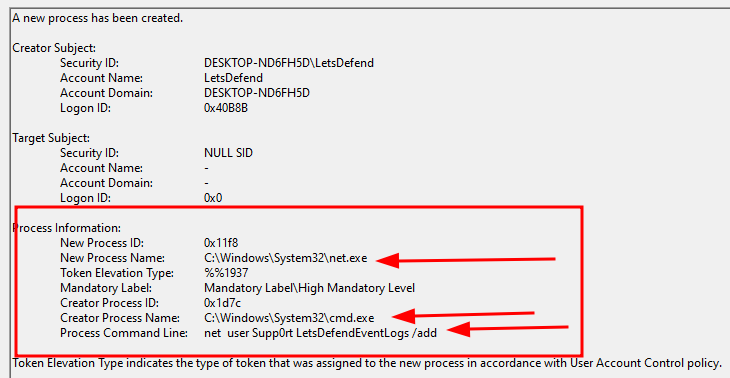
This example event shows us the power of the Process Command Line. We can immediately see the purpose of the process and observe that the process net.exe was spawned by cmd.exe and the command line is "net user Supp0rt LetsDefendEventLogs /add".
"net.exe is a native binary and is used to manage users/groups on a system. In this example, it is obvious that the attacker has created a backdoor user account [MITRE Tactic: T1136], and due to the command line auditing, we now have the adversary-controlled account's password as well for more context.
We can identify many different security events just by checking Process Logs. They should be configured in every enterprise environment and stored in a centralized SIEM solution.
In this section, we have discussed how to configure event log audit settings, how to understand log fields, and how to use this data source as an efficient analyst/hunter to hunt for malicious activity.